
Hey everyone! It’s been a while since I’ve written a new article, mostly because of welcoming two new members to the family over the past two years (a 4th kid + a dog!). However, I haven’t been completely inactive. I sold my 3090 and picked up a much slimmer ASUS RTX 3080 (yes, it’s a blower model! I love my blower cards).
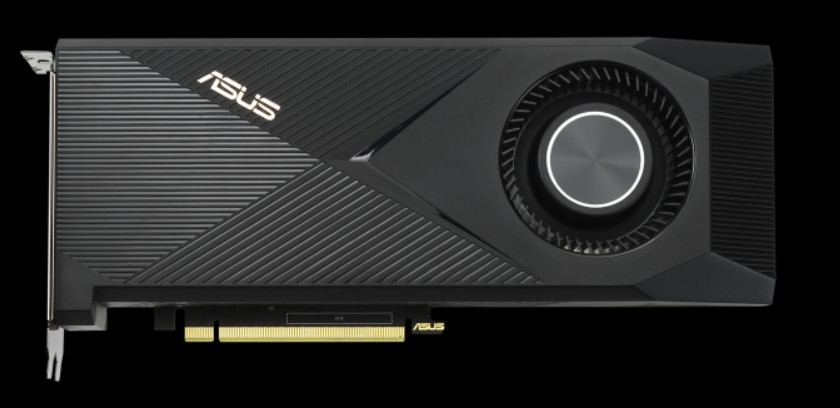
This card is a workhorse! I’ve been using it to game in 1440P and run diffusion model image generation. Although it doesn’t have nearly as many CUDA cores or as much memory as the 3090, this card still handles everything I throw at it. I expect it would struggle a bit with 4K gaming on ultra settings, but my gaming days are long behind me so I’m happy as can be.
Anyway, I thought I’d throw together a short review before moving on to more modern GPUs. Here is how the 3080 stacks up compared to the rest of the NVidia lineup I’ve tested so far:
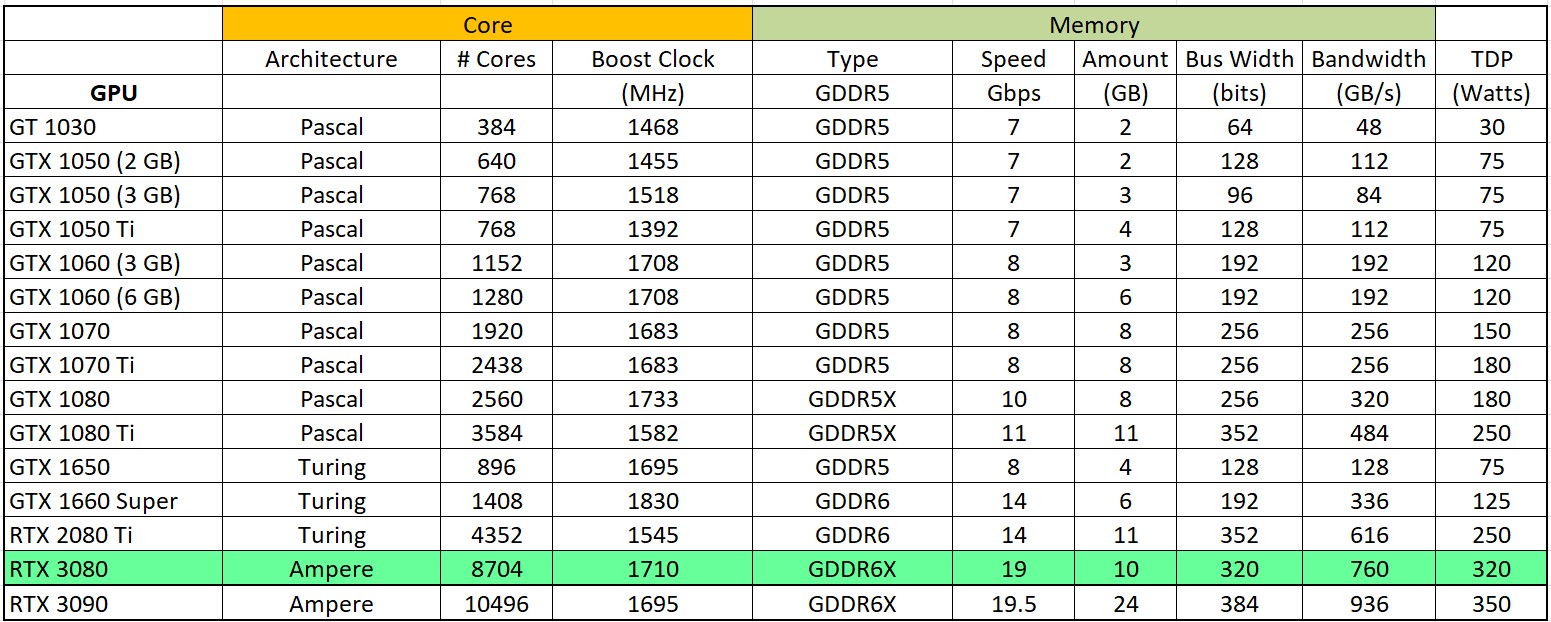
From eyeballing this chart, it appears the 3080 should be significantly slower than the 3090 in compute workloads, since it has over 1000 fewer CUDA cores and less than half the memory. However, as we’ve seen before, for the majority of molecular dynamics models, there is a point of diminishing returns after which a single model simply cannot fully exercise the massive amount of hardware available to it.
I used my AMD R9 3950X-based benchmark desktop, which admittedly is getting a little long in the tooth at 5 years old (remember all those COVID incentive check PC builds!). The point is, the hardware is consistent except for the graphics card being tested, and I’m pretty sure the monstrous 16-core flagship Ryzen 9 3950X is still more than capable of feeding Folding@Home models to modern graphics cards. All power measurements were taken with my trusty P3 Kill A Watt meter at the wall (grab one on Amazon here if you want. I don’t get anything from this link…it’s just a nice watt meter and you should definitely own one or five!)
I used the Folding@Home Version 7.6.13 Client running in Windows 10 (although I am now on 11 as I type this, so perhaps there is a Win10 vs 11 comparison in the future). The card was running in CUDA mode, although I am going to stop noting that on the plots going foreword unless I specifically run a card with and without CUDA processing enabled in the F@H client.
Side-Note: The card shows up as the “LHR” model in the vBIOS. This stands for “Lite Hash Rate”. This is a now-obsolete limiter on the card’s mining hash rate to make it less appealing to cryptocurrency miners, and has minimal effect on Folding@Home performance according to various sources.
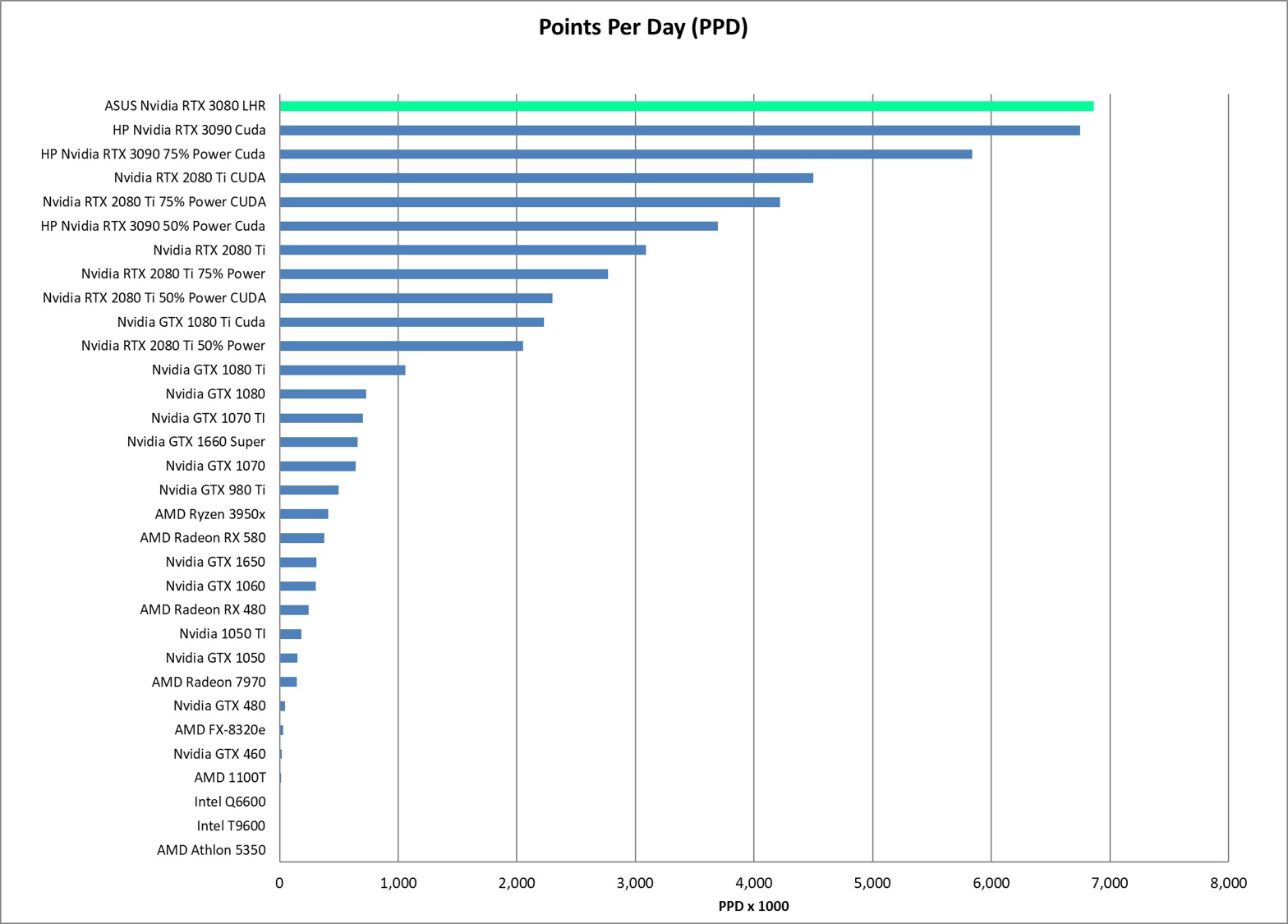
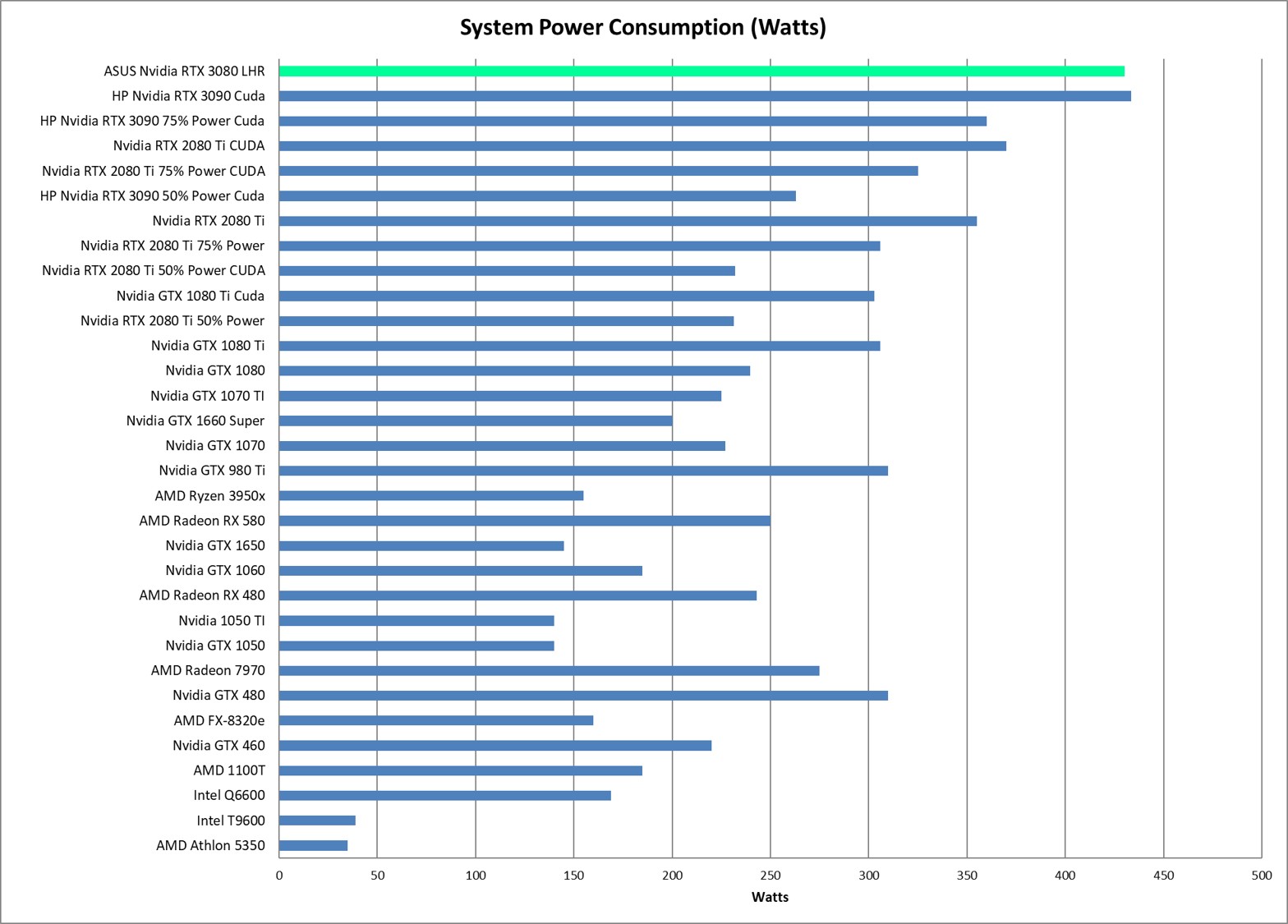
Since this is a short review, I will jump right to the Points Per Day (PPD) and Efficiency (PPD/Watt) results. They were surprising, to say the least.
Performance (Points Per Day) and System Wall Power (Watts)
Energy Efficiency (PPD/Watt)
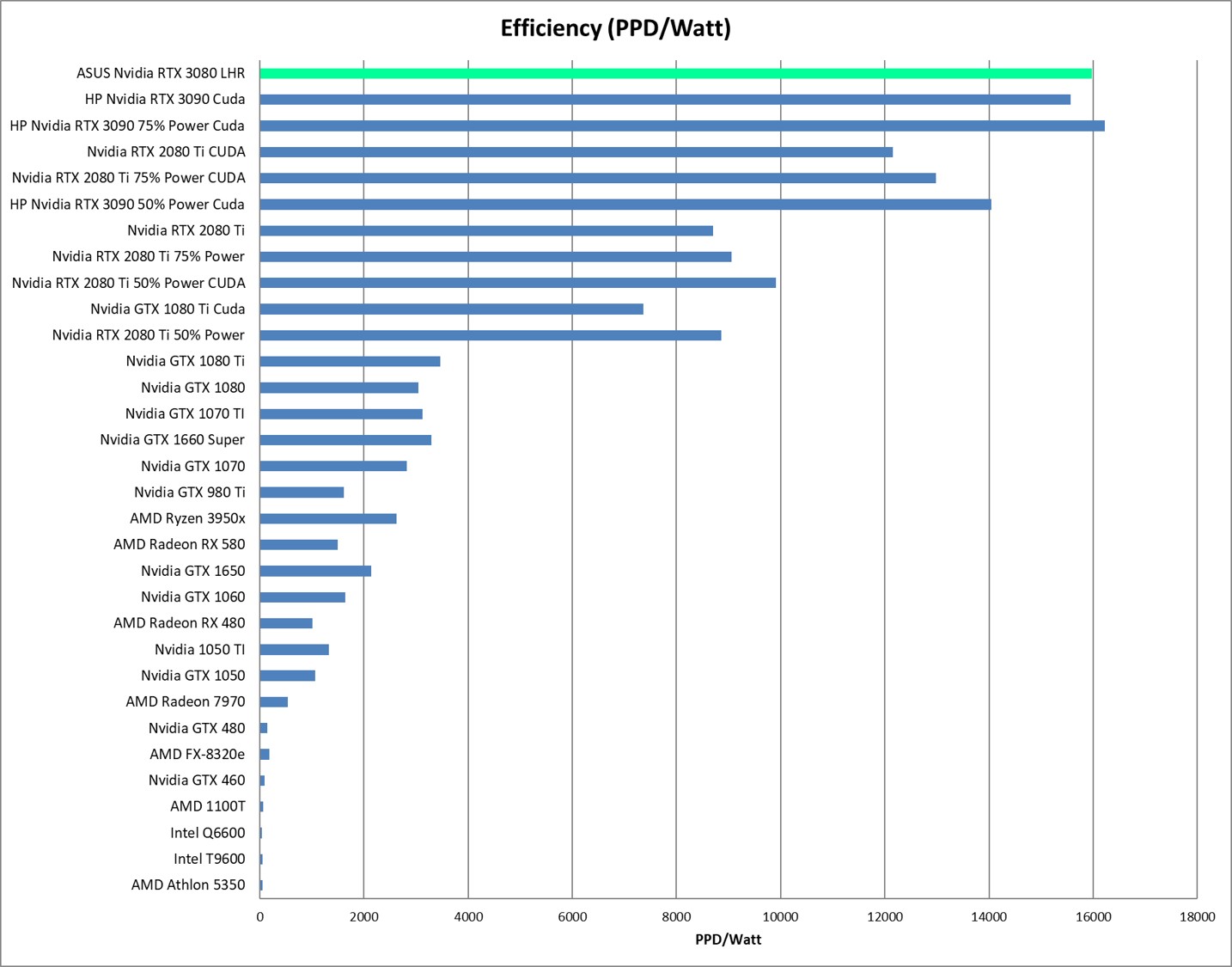
Conclusion: RTX 3080 Beats its Big Brother!
The RTX 3080 is a great GPU for compute workloads such as Folding@Home, and actually surpasses the 3090 in terms of raw performance by a small margin (687K PPD vs 675K PPD). Now this is only a 3% difference and thus is well within the normal +/- 10 percent or so variation that we typically see when running the same series of models over and over on an individual graphics card. Thus, I think the more appropriate conclusion is to say that the 3080 and 3090 perform the same on normal-sized models in Folding@Home. I believe the models are simply not large enough at the time of this writing to fully utilize the extra CUDA cores and memory that the 3090 offers. Additionally, the slight improvement in power efficiency comes from the fact that the 3080 draws nominally 30 less watts than the 3090, making it a slightly more efficient card. Only when reducing the power target on the 3090 to 75% was I able to match the out-of-the-box efficiency of the 3090.
So, there you have it. The 3080 continues the trend of its predecessors, started by the noble 1080 TI as one of the best bang-for-the-buck computational graphics cards money can by. If you want to do some cancer-fighting with your computer on the cheap, you can pick up a used 3080 on eBay right now for about $350.


 Green Folding@Home
Hey Chris,
Glad to see you are still doing some tests. I’m still folding on a 1660 Super, the decision to buy was based on my needs and one of your previous tests.
I hope to see future testing as well, it’s of great use to people looking for new gear. I’m probably getting a 5060 variant soon.
And don’t forget, even if it’s just short term testing you can fold for Nuclear Wessels!
The 1660 Super is a great card, lots of good work output for little power consumption. If you pick up a 5060, let me know how it does!
I have a question or two about PPD/Watt reckonings. I have no rigs with heavy GPU, or such as would be supported by FAH for the foreseeable future. I’d to contribute still anyway, as I have done for many years, with CPU only WUs. Even though utility factor of most CPUs for protein folding purposes seems by now to be lagging way behind newer GPUs (or AI specialty hardware?), to the point where it’s often a long wait to get a fresh unit when one finishes. It’s not so fashionable for point maximizers, but one can fancy that the molecular biologists still appreciate the contributions of CPU folding enough to keep up the work flow.
Presuming that CPU WUs are configured in a way where the point system between work unit types is commensurate, not unduly advantaging one type over the other, for cause unrelated to the value of the science data collection. So with all this stated, can I get comparable PPD/Watt performance with, say, an Intel core i5-1235U, at least close to an order of magnitude? It seems to run no more than a humble 2.2GHz peak with all cores fully occupied, but the power draw is still modest, like with an HTPC.
Thoughts?
CPU work units are certainly still valuable. I’m not a scientist, but I’ve been told that there are certain classes of molecular dynamics problems that can only run on CPUs. This is why the CPU client still exists, and why there are still work units for CPU-only folding rigs. That said, the PPD equation is heavily biased towards quick return (the Quick Return Bonus makes up most of the points). So GPUs are going to generate very high rewards because of how fast they can turn work units around.
I recommend taking a look at the base credit for the CPU work units and compare it to the GPU work units. That will give you a feel for how much the pure science value of the work unit is, regardless of how fast it is returned.
My folding experience on processors has shown that they can still produce pretty good returns (check out my article on the 3950X). They won’t match GPUs however unless the Folding@Home consortium decides to change the weighting of the quick return bonus to give CPUs a chance.
Fire up that i5 and let us know what kind of PPD it generates!
I calculated these CPU and GPU ppd/watt ratios, GPU power (system usually 50-100W more)
3700X: 110W, 12 cores running, 4GHz, 214K ppd, ratio=1945
2080 TI, 243W, 1.7 GHz, 2.5M ppd, ratio=10288.
4070 laptop: 120W, 4GHz, 6M ppd, ratio=50000.
5070: 190W, 2.8/1.7 GHz, 12M ppd, ratio=63157.That makes a decent CPU 32 times less efficient than a decent 500$ GPU (5070).